Build your first simulation
The standard workflow, start to finish: assemble a flowsheet, set conditions, run it, and read the results — or just describe the process to the AI copilot and let it build the whole thing.
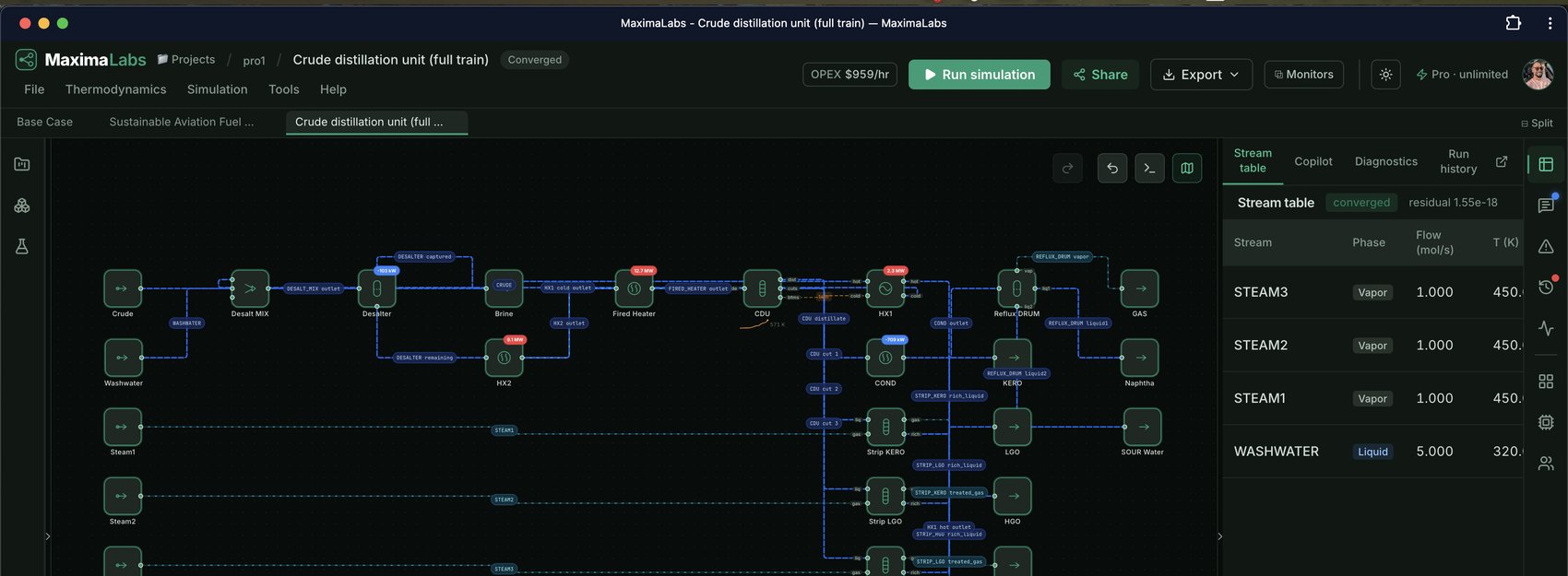
A solved flowsheet: the canvas, the live stream table, and convergence — what you're building toward.
Eight steps from blank canvas to converged results
Do them in order the first time; after that you'll mostly just talk to the copilot.
Start — two ways in
The workspace opens with a ready-to-run ethanol-water distillation, so you can hit Run simulation immediately to see how it works. To build your own, either describe it to the AI copilot in plain English (the fastest path — it builds the whole flowsheet), or assemble it on the canvas yourself with the steps below. You can also start from a pre-built template.
Add unit operations
Open the Units palette in the left activity bar and drag a unit — column, reactor, heat exchanger, flash drum, pump, mixer, and 50+ more — onto the canvas. Press Ctrl/⌘ B to toggle the left drawer, and use the industry filter to narrow the palette to your field.
Connect streams
Drag from a unit's output handle to the next unit's input handle to draw a stream between them. A flowsheet runs from a Feed node, through your units, to one or more Product nodes.
Set the feed conditions & composition
Click a Feed node to open its parameters, and set the flow (mol/s), temperature (K), pressure (Pa), and phase. In the Composition editor, use the “add a component” box to add any chemical — you're not limited to ethanol/water. See the full list and the three ways to add one in the component library.
Choose a thermodynamic package
Pick a property method from the Thermodynamics menu (or override it per unit for a mixed-package flowsheet). Rules of thumb: NRTL / UNIQUAC for polar mixtures, alcohols, and water; Peng-Robinson / SRK for hydrocarbons and gas processing; steam tables for water/steam. If you use the copilot, it selects this for you.
Run the simulation
Hit the green Run simulation button. The solve runs in the background and its status streams live — recycle loops converge automatically. The status bar's Steady-state · Pressure-driven · Dynamic toggle switches how the same model is solved when you need it.
Read the results
The Stream table (right panel) lists every stream's flow, temperature, pressure, and composition. If a solve fails, the Diagnostics tab explains why in plain English and offers one-click fixes. Run history keeps a signed record of every solve.
Iterate with the copilot
Ask the Copilot to change conditions, add a unit, optimize for energy or cost, or explain a result — it edits the flowsheet and re-runs. Everything the solver computes is deterministic; the AI points, the solver confirms.
Where to go next
Deeper references once you've got the basics.